HomeBlogBlogMagLock 360 Phone Holder Tripod: Calls, Filming, Travel

MagLock 360 Phone Holder Tripod: Calls, Filming, Travel

MagLock 360 Phone Holder Tripod: Calls, Filming, Travel

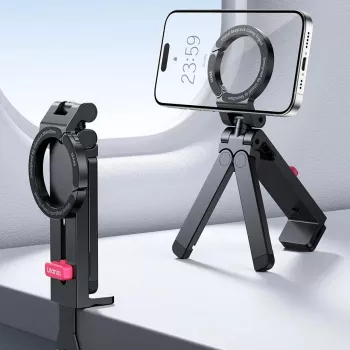
MagLock 360° Adjustable Phone Holder & Tripod Stand: Flexible Support for Calls, Filming, and Everyday Hands-Free Use

A phone stand that can quickly switch from desk support to tripod mode makes everyday tasks—video calls, filming, streaming, cooking, studying, and travel—far easier. The MagLock 360° Adjustable Phone Holder & Tripod Stand is built for fast mounting, flexible positioning, and stable support, so a phone can stay centered, level, and hands-free in more places.

It’s especially useful when a full-size tripod feels like overkill, but holding a phone by hand isn’t steady enough. With quick attachment, rotation, and adjustable angles, you can move from “quick glance” to “ready to record” without rebuilding your setup.

What this stand helps with day to day

  • Hands-free video calls with the camera kept at eye level to reduce awkward angles and “up-the-nose” framing.
  • Content creation for short videos, tutorials, and product shots without needing a bulky full-size tripod.
  • Kitchen and desk use for recipes, timers, and notes—keeping the screen readable and off the work surface.
  • Travel-friendly filming for quick clips and group photos using a compact support.
  • Study and work sessions for recording presentations, unboxing, crafts, or handwriting from above with angle adjustments.

If you’re building a simple home study routine, pairing a phone stand for recording or focus timers with a structured guide can be a practical combo. For example, the Homework Help Made Easy Toolkit for Parents – Printable Guide for Creating Study Habits, Homework Strategies & Independent Learning can help organize sessions while the stand keeps the phone visible and hands-free.

Design highlights that matter in real use

  • Magnetic-style mounting for quick attach and detach, reducing the fuss of clamps and tightening knobs.
  • 360° rotation support to move between portrait and landscape without re-building the setup.
  • Adjustable viewing angles for comfort while seated, standing, or filming from different heights and surfaces.
  • Tripod function for stability when filming or using the phone as a webcam alternative.
  • Compact footprint for small desks, nightstands, and countertop corners.

Magnetic attachment is particularly convenient for frequent “grab-and-go” moments—checking a recipe, taking a call, then switching to a quick recording—because the setup time stays short. If you’re using a MagSafe-capable iPhone, it’s helpful to understand the basics of the system and compatible accessories via Apple Support: About MagSafe on iPhone.

How to set it up for stable shots and comfortable viewing

  • Start stable: place the stand on a flat surface and ensure all legs or supports are fully opened before mounting the phone.
  • Center the phone: especially important for larger phones to reduce tilt and improve balance.
  • Adjust in the right order: rotate to portrait/landscape first, then fine-tune the tilt so you’re not fighting gravity while adjusting.
  • Mind the base footprint: for tabletop filming, keep the phone’s weight over the middle of the base; avoid extreme side angles on narrow surfaces.
  • Overhead-style angles: increase stability by placing the stand on a wider surface and keeping the phone closer to the center line.

A simple steadiness test before recording: lightly tap the table near the stand. If the view shakes a lot, move the stand away from the table edge, reduce the tilt angle, and re-center the phone on the mount.

Compatibility and fit checks before buying

Magnetic mounts are simplest when the phone and case are designed for magnetic attachment. If not, a compatible ring or case can usually bridge the gap—but hold strength depends on the accessory quality and how heavy your phone is.

Quick compatibility checklist

Device setup What to confirm Why it matters
Magnetic-compatible phone/case Mount attaches securely and sits flat Reduces slipping and keeps framing steady
Non-magnetic phone Magnetic ring or compatible case added Enables reliable mounting without clamps
Thick or rugged case Hold strength is adequate for tilt angles used Prevents gradual sagging during recording
Large/heavy phone Phone remains centered and stable on the base Improves balance and tip resistance

Practical ways to use it (with setup ideas)

  • Video calls: set the phone at eye level, rotate to landscape for wider framing, and angle slightly downward for a natural look.
  • Desk productivity: keep the phone beside a laptop for notifications or timer apps without covering keyboard space.
  • Fitness and practice: place it on the floor or a low table, angle up, and keep the base fully supported to avoid wobble from movement.
  • Cooking: position away from steam and splatter, then tilt to reduce glare from overhead lights.
  • Travel clips: use tripod mode for quick self-timers; keep the stand on stable surfaces (benches, rocks, tables) rather than soft ground.

Care, safety, and troubleshooting

MagLock 360° Adjustable Phone Holder & Tripod Stand at a glance

For transparency when evaluating product claims or reviews online, it’s also worth knowing how disclosures should work. The FTC’s endorsement guides outline best practices around testimonials and influencer recommendations.

FAQ

Will it work if the phone does not have built-in magnetic support?

Yes. A compatible magnetic case or an adhesive magnetic ring can enable use, but the hold strength will depend on the quality of the accessory and the weight of your phone (especially at steeper tilt angles).

Can the phone rotate from portrait to landscape without removing it?

Yes. The stand supports 360° rotation, so you can switch orientations while the phone stays mounted. For best stability, rotate first and then fine-tune the tilt.

How can wobble be reduced when recording video?

Use a flat surface, fully open the stand, and center the phone on the mount. Avoid extreme tilt angles and keep the setup away from desk vibrations like typing or bumping the table.

Was this article helpful?

Yes No
Leave a comment
Top

Yay! 10% Off Just for You!

Join our community and enjoy 10% off your first order. Subscribe for exclusive deals!

Shopping cart

×